EVS Presentation and Demo License Installation
Earth Volumetric Studio is available only as download from https://client.ctech.com/
Each user should install the latest versions available from the download site:
- Earth Volumetric Studio
- Earth Volumetric Studio Sample Projects
Warning
Installation of EVS requires Administrator rights.
Run each executable and follow the instructions to set your preferred install folder and options.
With all license types, the first step of client setup (after EVS software installation) is to set up the proper license type in the C Tech License Manager. The C Tech License Manager has many additional functions discussed in this topic.
Below are the correct options for a Presentation and Demo License. Be sure to set your User and Organization name correctly, as this will be important in order to receive technical support in the future.
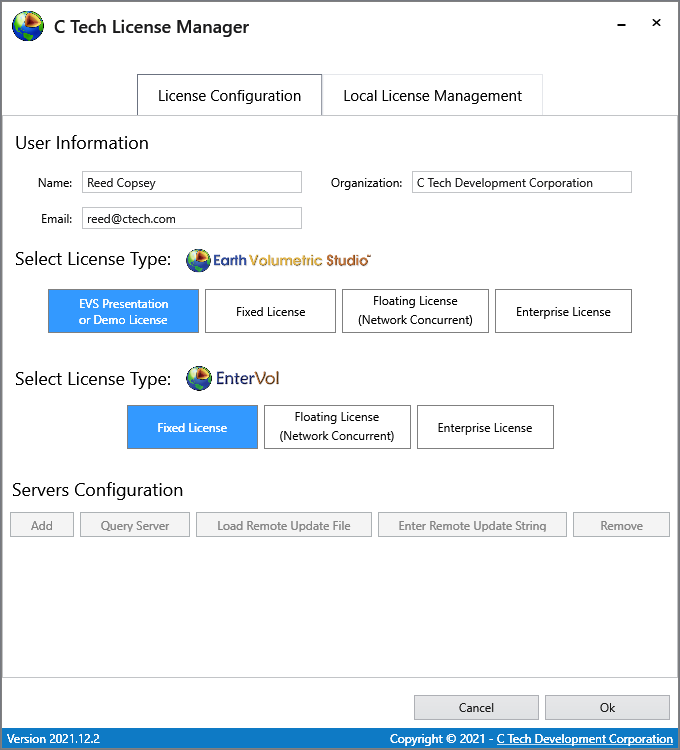
When you click OK on the window above, it will open the last C Tech License Manager window shown below. In this window we request your permission to send automated error reports to C Tech should you encounter a problem while using the software.
Tip
Allowing Reporting (especially Full Reporting) will allow us to provide you with a higher level of Technical Support should you encounter an unexpected problem.
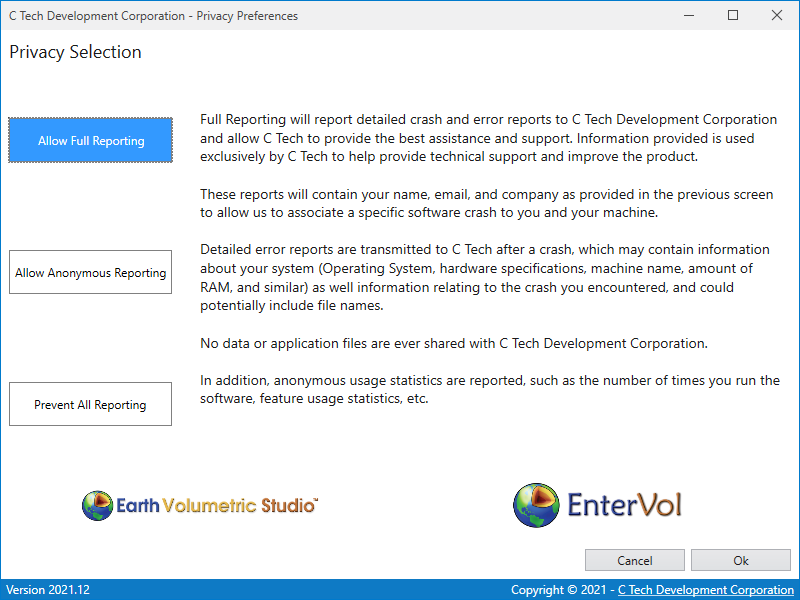
Once the C Tech License Manager (shown above) is closed, it will not reopen unless you run it explicitly. Each time you start Earth Volumetric Studio, the options you have set above will apply.