Finding Modules in the Application Network
For large or complex application networks, the search functionality provides an efficient way to locate specific modules. The search tool is located in the toolbar at the top of the Application window.
Using the Search Tool
The appearance of the search tool depends on the available width of the Application window. In narrower views, it may appear as a magnifying glass icon. In wider views, it will be displayed as a full search box labeled “Search for Module in Application”.
To use the search, you can either begin typing the name of the module you wish to find or click on the search box (or icon). Clicking will reveal a dropdown list containing all modules currently in the Application Network. Selecting a module from this list will immediately locate it.
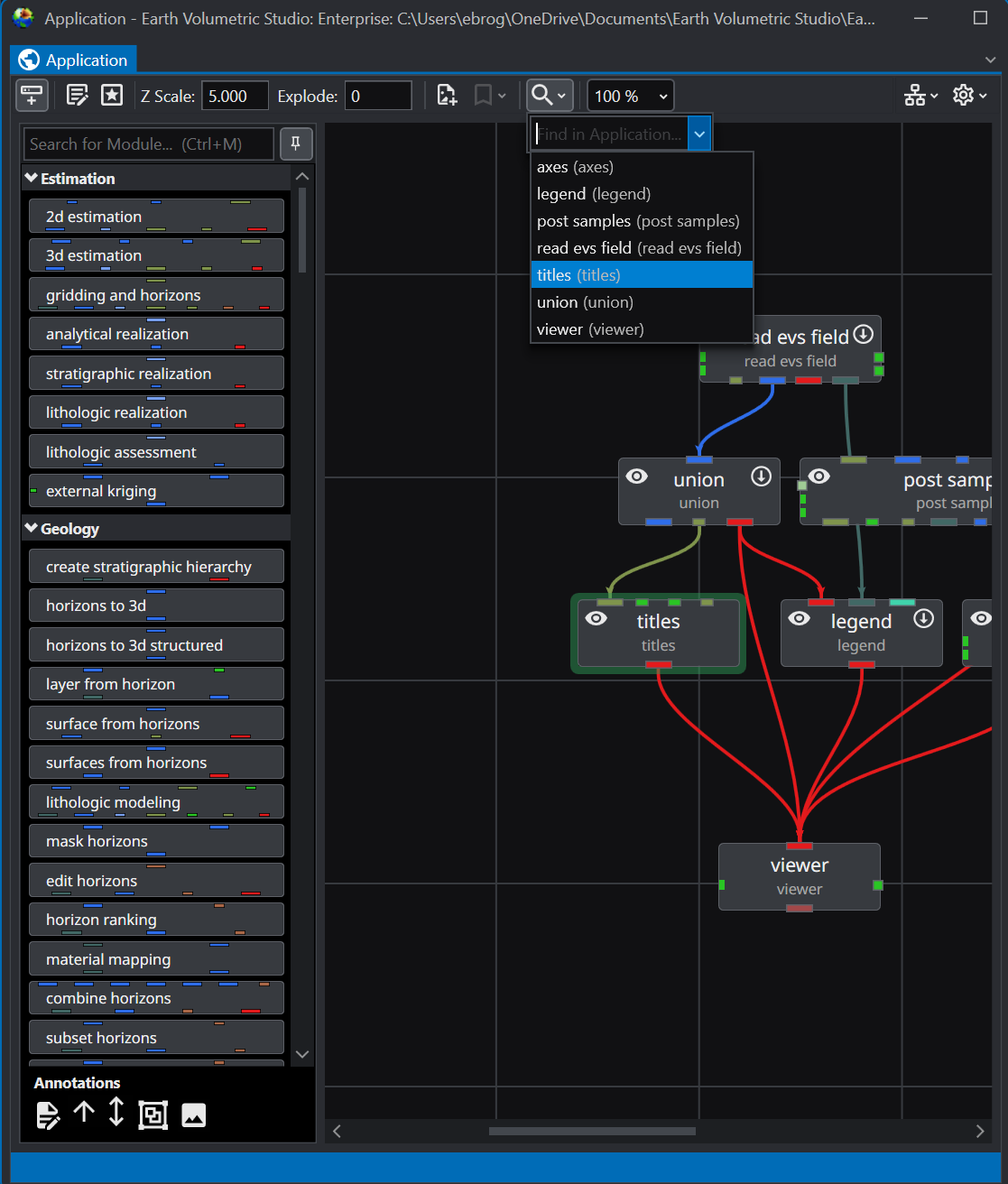
Search Results
When you select a module from the search results, two actions occur simultaneously in the user interface:
- The Application Network view will automatically pan and zoom to center on the selected module, which will be highlighted with a green outline for easy identification.
- The **Properties**window will update to display the parameters for the selected module. This allows for immediate access to view or edit the module’s settings without needing to manually select it in the network.
This integrated functionality streamlines the process of navigating and editing complex workflows, making it easy to manage even the most extensive application networks.