Sequences are used to create dynamic and interactive applications by managing an ordered collection of predefined “states.” A state can capture and control the properties of one or more modules simultaneously.
This functionality allows you to guide a user through a narrative or a series of analytical steps, such as changing an isosurface level, animating a cutting plane through a model, or stepping through time-based data.
What is a Sequence?
A sequence represents a set of saved configurations. Each state in the sequence stores specific values for properties in your application. When a user selects a state - typically through a UI control like a slider or dropdown menu - the application instantly updates all linked modules to their saved settings for that state.
It is important to understand that these states are discrete. The application creator defines exactly which states are included in the sequence. For example, if you create a plume sequence with concentration levels of [0.01, 0.1, 1.0, and 10.0], the user can only select those specific four levels; it would not be possible for them to view the plume at a level of 3.0.
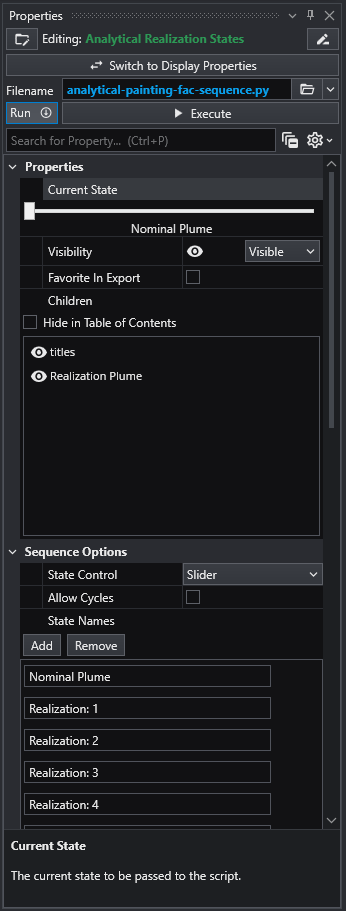
Here is an example of the “scripted sequence” module’s UI showing several states:
Examples
Sequences can range from simple to complex, depending on what they control.
- Simple Example: A common use is to control the isosurface level of a single
plumemodule. The sequence would contain a series of states, each corresponding to a different concentration threshold. This creates a way to explore how the plume’s size and shape change at different levels. - Complex Example: An advanced sequence could link multiple modules together. For instance, a single slider could simultaneously:
- Move a
sliceplane through the model. - Change the
plumelevel being displayed. - Update a
titlesmodule to show the calculated volume and mass of the currently visible plume.
- Move a
Sequences in C Tech Web Scenes
When you export your application to a C Tech Web Scene (.ctws file), sequences become a primary component of the interactive experience.
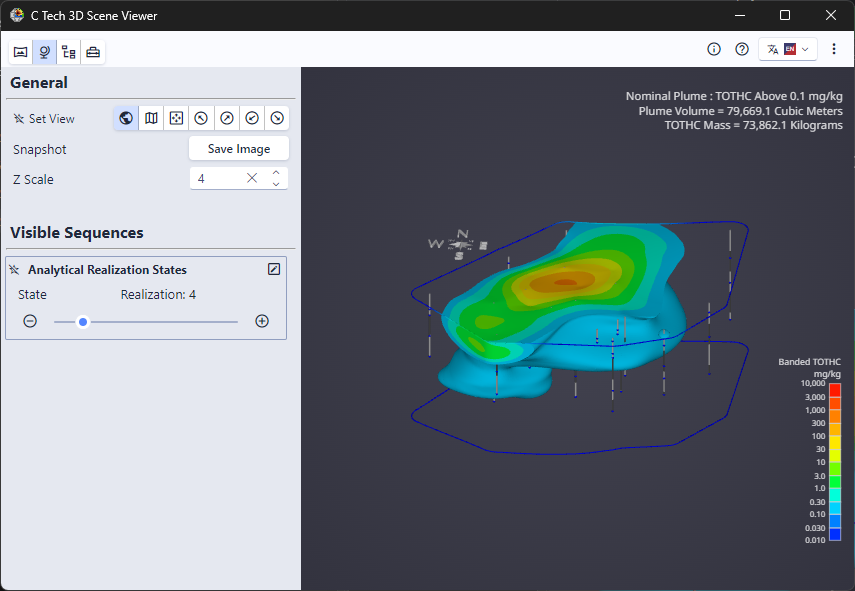
- In the Web Scene’s Table of Contents, each sequence appears as a single item with a unique icon, along with its associated UI control (e.g., a slider).
- A Web Scene can contain multiple, independent sequences. The total number of unique model configurations is the product of the number of states in each sequence. For example, an application with one sequence of 10 plume levels and another sequence of 5 time steps has a total of 50 (10 x 5) possible combined states.
Important Considerations
- Performance and File Size: Be mindful of the number of states in your sequences. An excessive number of states can significantly increase the size of your exported
.ctwsfile and lead to longer load times. It is best to include only the most essential states needed to tell your story. - Discrete States: As mentioned, sequences are not continuous. They only contain the specific states you save. Plan ahead to ensure all necessary steps or levels are included in your sequence definition.