edit_horizons is an interactive module which allows you to probe points to be selectively added to the creation of each and every stratigraphic horizon. This provides the ability to manual edit horizon surfaces prior to the creation of geologic models.
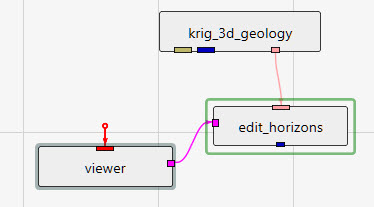
The method of connecting edit_horizons is unique among our modules. It uses the pink output port from gridding and horizons as its primary input, and it also requires the purple side port from viewer since it requires interactive probing. Its blue output port then becomes equivalent to the blue output of gridding and horizons, but with edited surfaces.
Regardless of the estimation method used originally, edit_horizons uses Natural Neighbor to perform its near-real-time modifications. For this reason, there is a Use Gradients toggle at the top of the user interface, which is identical in function to the one in gridding and horizons.
The other important parameter at the top of the user interface is the Horizon Point Radius. The default (linked) value for this parameter is computed for you as 2% of the X-Y diagonal extents of your input geology. If any of the original data points for the selected horizon being edited fall within the Horizon Point Radius, then we don’t use your probed point based on the assumption that the original data is more defensible and should take precedence.
Next there is the Probe Action, which has 3 options:
- None (default state when the module is instanced)
- Reset Position (allows you to move points)
- Add Point (allows you to add new surface control points for the selected horizon)
The Horizons list shows all of your geologic horizons. Here, you select the horizon surface you wish to modify. The points that you add only affect the selected horizon. When you change the selected horizon, you can add new points for that surface. You are able to add as many points as you need for any or all of the horizons.
The Horizon Point List is the list of points that you have added by probing in your model. You can only probe on actual objects. These objects can be surfaces from horizons, slices, tubes, or whatever objects you’ve added to your viewer. Slices are very useful since you can move them where you need them so you can probe points at specific coordinates. You are also able to manually change the X, Y, and/or Z coordinates or any point as needed. For each point, a Note: box is provided so you can keep a record of your actions and reasons.